


Findmykids: Kids GPS Tracker
LETEM LTD
Keeping track of a child is less about watching a map constantly and more about having a dependable way to check in when plans change. I found Findmykids: Kids GPS Tracker most useful in that space: it turns a phone into a family-location tool that can be checked quickly, without pretending to replace a conversation or a child’s judgment. It is a free parenting app from LETEM LTD, available for Everyone, and its focus is refreshingly narrow compared with all-purpose family apps.
That narrow focus also explains its appeal. I would recommend it to a parent who wants a simple way to see where a child’s phone is during a school journey, an outing, or a visit with relatives. I would not choose it for someone looking for a full family organizer, a broad parental-control suite, or a solution that works independently of a child carrying a compatible phone. The distinction matters: this is primarily about location awareness, not managing every part of family life.
How Findmykids feels in everyday use
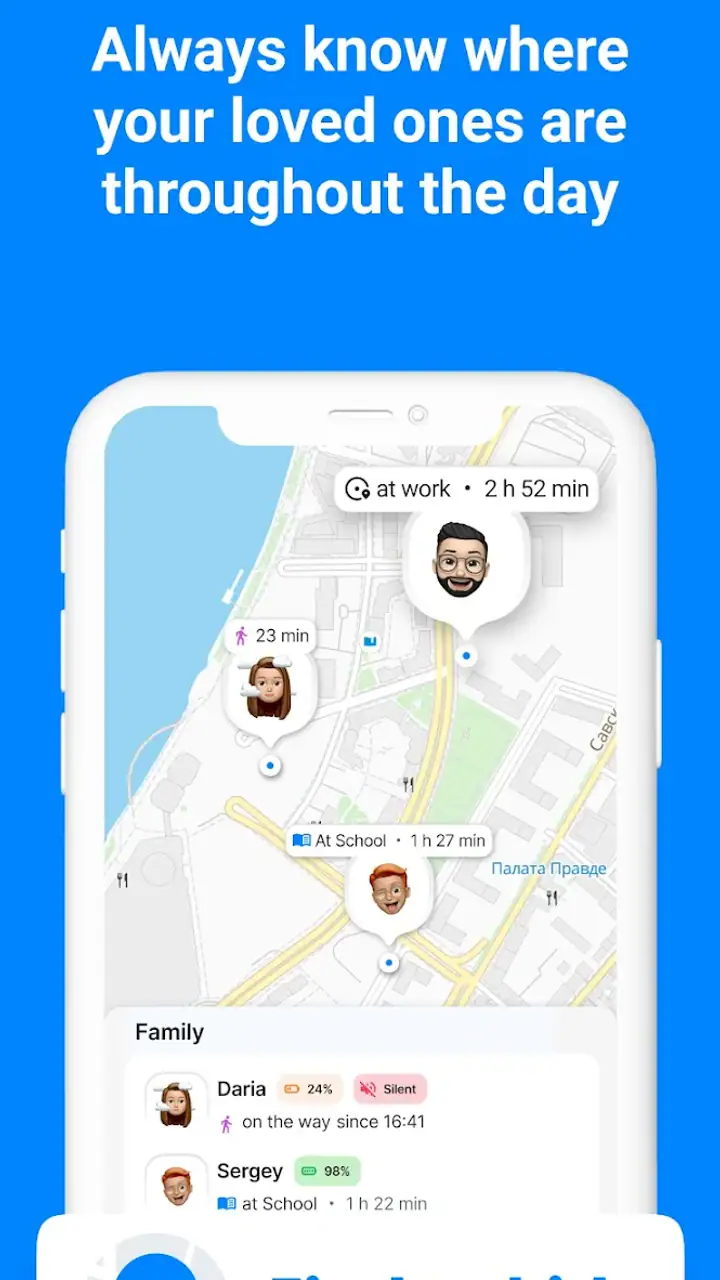
The first impression is straightforward. The app is designed around the question parents usually ask in a hurry: where is my child right now? That makes it easier to understand than services that bury location inside calendars, messaging, screen-time controls, and household dashboards. In my experience, a focused interface can feel faster even before considering network conditions, because there are fewer decisions between opening the app and reaching the relevant information.
There is a practical difference between a location app that is easy to open and one that is merely feature-rich. If I am waiting for a child who normally arrives after school and the usual routine has changed, I want the location view to be obvious. Findmykids is built for that kind of quick check rather than for extended browsing. The useful habit is to open it before calling, use the displayed location as context, and then decide whether a message or phone call is actually needed.
Its popularity gives some context without proving that every family will have the same experience. The app has an average rating of 4.6 from around 1.9 million ratings, with over 50 million installs. Those figures suggest that the basic idea resonates with a large audience, but they should not be mistaken for a guarantee of precise or instant results in every home. Location depends on the child’s device, connectivity, battery condition, and the surrounding environment.
Latest News

Uber Eats Under Pressure: What Happens When Delivery Goes Wrong

How QR & Barcode Scanner Adapts to Android and iOS Innovations

Why Waze Navigation & Live Traffic Is Your Essential Travel Companion

CapCut Mastery: Unleash Hidden Features for Pro-Level Editing

How OS Updates Enhance Roblox Adventures

Teacher Simulator: Exam Time Turns Quick Classroom Judgments into a Repetitive Loop
Speed depends on more than the app itself
Perceived speed is one of the most important parts of a tracker. When I check a map, I am usually not looking for a detailed report; I want a useful indication quickly. Findmykids benefits from keeping that central task clear. The app does not need to feel like a large social platform before it becomes useful, and that helps the first interaction feel direct.
Still, a location tracker cannot create a fresh position from nothing. If the child’s phone has weak connectivity, limited battery, or difficulty determining its position, the map may not reflect the situation as quickly as a parent expects. This is not a reason to dismiss the app, but it is a reason to avoid treating the screen as an unquestionable live feed. I would read a delayed update as a prompt to try another contact method, not as evidence that a child is necessarily in trouble.
A good routine improves the experience. Before a busy day, I would make sure the child’s phone is charged, connected, and carried rather than left in a school bag or at home. I would also explain to the child why the app is being used. That conversation is not a technical step, but it prevents location tracking from becoming a source of confusion or mistrust. The strongest setup combines the app with clear family expectations about when location checks are appropriate.
Gallery
What happens during heavy-use moments
The demanding moments are not necessarily when a parent opens the app once. They are more likely to happen when several family members are moving around, a child’s route changes, or a parent repeatedly checks the map because an arrival is late. In those situations, the value of a simple design becomes more obvious, but so does the need for patience. Repeatedly refreshing a screen cannot fix a phone that has poor reception or a depleted battery.
I would use Findmykids differently depending on the situation. For a normal school commute, one check near the expected arrival time may be enough. During a crowded event, I would agree on a meeting point first and use the app as a backup. In a family with several children, I would avoid turning the tracker into a constant monitoring habit; a short, purposeful check is less stressful than repeatedly interpreting small changes on a map.
One less obvious trade-off is that convenience can encourage overchecking. The app makes it easy to look, but easy access does not mean every location change deserves attention. Parents who already feel anxious about safety may find that a tracker reassures them in one moment and creates another reason to worry in the next. I think the healthiest workflow is to define a few practical situations for using it, such as a delayed pickup or an unfamiliar trip, rather than opening it automatically throughout the day.
The app is also more useful when adults agree on who is responsible for checking. If several relatives all monitor the same child without communicating, a small delay can lead to duplicate calls and unnecessary alarm. Findmykids can support coordination, but it cannot replace a family plan. Decide who will respond first, what counts as a genuine concern, and when to switch from checking the app to calling directly.
Stability and recovery when conditions change
For a tracker, reliability is not only about whether it opens. It is about whether the family can recover sensibly when an update looks old, a device moves through a difficult area, or the app does not immediately show what someone expected. My view is that Findmykids is best treated as one layer of a safety routine. Its location view can reduce guesswork, while a phone call, a known route, or an agreed meeting place provides the fallback.
If the displayed position seems inconsistent with the child’s plans, I would first check the simple explanations: is the child still carrying the phone, is the phone powered on, and could the location be from an earlier moment? Then I would contact the child. This order prevents a common mistake in location tracking: escalating based on a map before checking whether the device itself is available.
Recovery is also easier when expectations are realistic. I would not install this app and assume that every phone will behave identically. The current Android version is 2.10.40-google, and Android support begins at version 8.0. That makes the app accessible to many Android users, but device age and manufacturer settings can still affect how comfortable the experience feels. A parent using an older phone should pay particular attention to whether ordinary use remains smooth rather than assuming the newest app release will transform older hardware.
Stability can be affected by the wider phone environment too. A device with very little free storage, aggressive background management, or many demanding apps may behave differently from a clean, modern handset. I am deliberately not treating that as a defect unique to Findmykids. It is simply an important reason to test the family’s actual phones before relying on the app during travel or an unfamiliar outing.
Device limits parents should understand
The biggest constraint is simple: the child needs to have the relevant phone with them and in a usable state. A tracker cannot help if the device is forgotten, switched off, out of power, or disconnected. That sounds obvious, but it is easy to overlook when an app’s purpose is described in terms of location. I would make “phone charged and carried” part of the same routine as putting on a coat or taking a school bag.
Older Android hardware may also make the experience less comfortable, especially if the phone already struggles with everyday apps. Because the minimum operating-system requirement is Android 8.0, the app is not aimed only at the newest devices. Even so, operating-system compatibility is not the same as identical performance across every model. If a child uses an older handset, I would test it at home, check how quickly the map becomes useful, and see whether normal phone use remains practical.
Resource demands deserve a balanced view. A location service naturally asks a phone to do work in the background, and that can matter on a child’s device with a small battery or heavy daily use. I would avoid judging battery impact from a single afternoon. Instead, compare a normal school day with the app in place and watch whether the child still has comfortable battery headroom. If the phone is already close to empty by pickup time, the family may need a charging routine or a different approach.
This is also where a conventional alternative may be better. Families who already use built-in location sharing on their phones may prefer keeping everything inside a familiar system, particularly if they only need occasional location checks. Findmykids makes more sense when parents want a dedicated parenting-focused experience rather than another general account setting. The better choice depends on whether simplicity means “one purpose” or “no additional app.”
Privacy, trust, and the human side of tracking
A location tool changes the relationship between convenience and privacy. I would not use it secretly. A child should understand that the app is there for agreed safety reasons, and parents should be willing to explain when they check it. That does not remove every concern, but it makes the arrangement more respectful and more sustainable.
The Everyone content rating makes the app approachable as a family product, but an age label does not decide how a household should use tracking. The important question is whether the level of monitoring fits the child’s age, independence, and circumstances. A younger child walking with family may need a different arrangement from an older child becoming more independent. Findmykids can support either situation, but the settings and expectations should change as trust develops.
I also think parents should separate safety checks from discipline. If every location check becomes a way to investigate ordinary behavior, the app can create tension even when it works perfectly. Used as a backup for travel, pickups, and unexpected delays, it feels more proportionate. Used as a substitute for communication, it becomes much less healthy.
Cost and what to consider before installing
Findmykids is free to download and use as a parenting app, while in-app purchases range from a small amount to as much as $349.99 per item. That wide range means I would look carefully at the purchase screen before committing to anything. A free entry point is helpful for testing the workflow on your family’s actual phones, but it should not be confused with a promise that every optional part of the experience will remain free.
My advice is to start with the basic experience and ask whether it solves the specific problem you have. If your need is simply to check a child’s location during a commute, you may quickly know whether the app feels clear and dependable enough. If you are considering paid extras, identify the exact benefit first rather than buying because the app is popular. The practical question is not whether an upgrade exists; it is whether it improves your family’s routine enough to justify the cost.
That approach also helps avoid a common trap with safety apps: paying for reassurance without changing the underlying routine. A charged phone, a clear pickup plan, and an agreed fallback call can be more valuable than adding another layer to the app. The software is useful when it supports those habits, not when it encourages parents to outsource every safety decision to a map.
Who will get the most from it?
I see Findmykids as a strong fit for parents of school-age children who carry Android phones and travel independently for at least part of the day. It is also practical for families whose schedules change often, such as parents sharing pickups or children spending time between two households. In those cases, a dedicated location check can reduce the number of “Where are you?” messages without making every journey a formal check-in.
It can be especially helpful during temporary changes: a new school route, a visit to relatives, a large public event, or the first few independent trips. These are situations where parents usually want reassurance without constantly calling. The app gives the family another source of context while the child learns the route.
I would be more cautious for families whose children do not carry phones, whose devices are too old or unreliable for regular use, or whose main need is screen-time management. I would also look elsewhere if a household wants a broad shared calendar, detailed communication tools, or a single platform for every parenting task. Findmykids is not weakened by being focused, but that focus means it should be chosen for the problem it is actually built to address.
My performance verdict
After considering speed, busy moments, recovery, and device limits, I think Findmykids succeeds because it keeps the central parenting task understandable. It can make a quick location check less awkward than searching through a general-purpose service, and its large user base shows that the approach has broad appeal. The free price makes it reasonable to test before deciding whether it belongs in your family’s routine.
My reservations are just as practical. Location information should never be treated as infallible, battery and connectivity still matter, and older phones may not feel as comfortable as newer ones. The app also requires a fair conversation about privacy and expectations. If those conditions are ignored, even a well-designed tracker can produce false alarm or unnecessary friction.
Overall, I would recommend it to a parent who wants a dedicated, easy-to-understand location companion and is prepared to keep a phone charged, explain the arrangement, and maintain a backup plan. I would skip it if I only needed occasional built-in location sharing or if my family wanted a complete parental-control system. For the right household, the best use of Findmykids is not constant surveillance, but calm, purposeful checking when a child’s whereabouts genuinely matter.
LETEM LTD has kept the product’s identity clear: it is a parenting app centered on family location tracking, rather than a crowded collection of unrelated tools. That clarity is its main strength. If your everyday question is “Can I quickly understand where my child’s phone is when plans change?”, this is one of the more direct options to try. Just make the app part of a wider family agreement, not the agreement itself.
FAQs for Findmykids: Kids GPS Tracker
How does the Findmykids app ensure the safety of my child's data?
Findmykids prioritizes user privacy by employing advanced encryption to protect all personal data. The app complies with global data protection regulations, ensuring that your child's location and personal information are stored securely. Additionally, data access is restricted to verified users, granting parents peace of mind regarding security.
What features does Findmykids offer to track my child's location?
The app provides real-time GPS tracking, allowing you to see your child's location on a map. It also offers location history, so you can review where they've been throughout the day. The app includes a geofencing feature, alerting you when your child enters or leaves designated areas.
Is Findmykids compatible with all smartphones?
Findmykids is compatible with both Android and iOS devices. It requires iOS 11.0 or later for Apple devices and Android 5.0 or higher. The app works seamlessly across smartphones, providing a consistent user experience regardless of the device type your family uses.
Can my child turn off the GPS tracking feature?
To prevent tampering, the app is designed with security measures that notify parents if the GPS or internet settings are altered. However, it's important to have an open dialogue with your child about the purpose of the app and how it helps ensure their safety, promoting a cooperative use.
Are there any subscription fees for using Findmykids?
While Findmykids offers a free version with basic features, it also provides a premium subscription that unlocks additional functionalities such as enhanced location history and more detailed alerts. Subscription options vary, allowing you to choose a plan that best fits your family's needs.
Pros
- Accurate GPS tracking for peace of mind.
- Easy setup and user-friendly interface.
- Instant alerts for any location changes.
- Battery level monitoring of kids' devices.
- Supports multiple devices with one account.
Cons
- Requires internet for real-time tracking.
- Limited features in free version.
- Subscription can be pricey for some.
- Dependent on child's phone battery.
- Privacy concerns with location sharing.


